A customer order comes in. Sales confirms the delivery date. The workshop thinks the components are available. Purchasing has not checked the requirements yet. A few days later, manufacturing is blocked because a part is missing, a quantity was miscalculated, or a production step was not planned.
This type of situation is common for B2B SMBs that manufacture, assemble, or transform products.
A manufacturing order, also known as an MO, helps plan and structure production, track progress, and keep a record of the components used and the finished goods produced.
In this article, we explain what you need to know about manufacturing orders.
A manufacturing order is a document, either paper-based or digital, that authorizes and organizes the production of a finished or semi-finished product. It states what needs to be made, in what quantity, using which components, through which steps, and within what timeframe.
In practice, the MO often connects a customer order, a replenishment need or a sales forecast, with the work to be carried out in the workshop. It turns a sales or logistics need into clear instructions for production teams.
The content of a manufacturing work order depends on how the company is organized, but the same information usually appears.
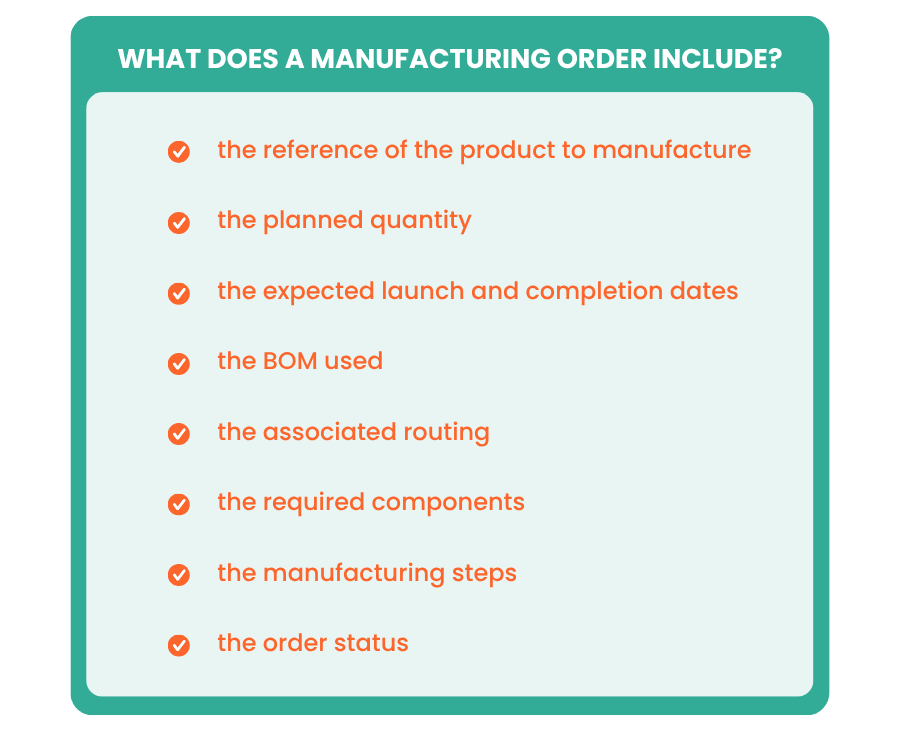
A manufacturing order generally includes:
In some companies, it may also include the workstation, the person in charge, estimated costs, quality instructions, or specific notes. The more structured the business is, the more the MO becomes a reference point that helps prevent omissions and different interpretations from one team to another.
A manufacturing order centralizes the information needed for production.
For teams, this brings immediate clarity:
This organization is especially useful when several departments are involved in the same workflow. Sales needs to confirm a delivery date. Purchasing needs to anticipate missing components. The workshop needs to know what to produce first, and management wants to track progress. The MO gives everyone a shared framework.
Manufacturing has a direct impact on inventory. When a finished product is made, components are consumed. If these movements are not recorded properly, theoretical stock can quickly become inaccurate.
A manufacturing order helps track this transformation more accurately. The required components are identified before production starts. During production, the quantities used are deducted from stock. Once manufacturing is completed, the finished goods are added to available inventory.
This process helps limit unpleasant surprises. It prevents the business from selling a product that is not actually available or launching production when a component is already missing.
An MO also helps track manufacturing performance. It makes it possible to compare planned quantities with actual quantities produced, promised deadlines with real delivery timelines, and expected components with components actually consumed.
Sometimes manufacturing requires an adjustment, material loss is normal, or a step takes longer than expected. The real issue is identifying these gaps. Otherwise, the same delays and discrepancies keep happening from one production run to the next, without the company really knowing where they come from.
A BOM, or Bill of Materials, is the list of components required to manufacture a finished product. It specifies the references used and the quantities needed to produce one unit of the assembled product.
You can think of it as a recipe. In a B2B company, a BOM may include raw materials, purchased parts, semi-finished products, packaging, or accessories.
A reliable BOM helps prepare manufacturing more accurately. It helps calculate requirements, check available stock, and avoid omissions. On the other hand, a poorly maintained BOM creates errors: purchasing orders components too late, the workshop runs out of parts, and inventory no longer reflects reality.
A routing describes the steps required to manufacture a product. It shows the order of operations, the pre-production, production, or post-production phases, and sometimes the workstations or resources involved.
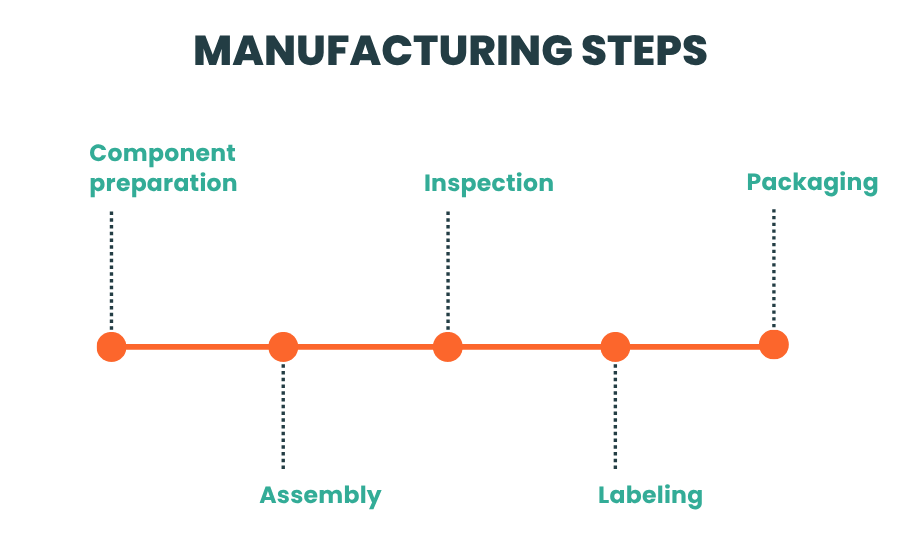
In an assembly activity, a routing may include:
In a transformation activity, it may include steps such as cutting, mixing, packaging, or verification.
A routing helps standardize the way products are made. It prevents manufacturing from being carried out differently depending on who is handling it. For an SMB, it is a simple way to gain consistency, especially when volumes increase or new team members join the company.
Creating a manufacturing order starts with a simple question: what needs to be made?
The company first identifies the finished or assembled product, then defines the expected quantity. This quantity may come from a customer order, a stock requirement, or a sales forecast.
Next comes the component check. This is where the BOM plays a direct role. Based on the BOM, the company can calculate the total quantities required for the entire production run.
Once the requirements have been defined, the company can plan manufacturing. This means checking availability, priorities, deadline constraints, and, depending on the activity, the necessary workstations or steps.
Planning is not just about the end date. It also helps organize resources. If production requires preparation, assembly, quality control, and then packaging, those steps must be included in the process.
Once the manufacturing order is launched, teams can move into execution. Components are reserved or used according to the company’s rules. The workshop knows how much to produce and which operations to follow.
During manufacturing, the MO must be updated. Production may be completed all at once or in several batches. It may move forward as planned, be put on hold, or require a quantity adjustment.
Tracking gives the company a realistic view of progress. How many units have been produced? How many are left to manufacture? Were the planned components enough? Was a step changed?
Closing happens when manufacturing is completed. This record is valuable for understanding what actually happened.
A manufacturing order can first be prepared without being launched. At this stage, information can still be modified. The company can adjust the quantity, correct the BOM, change the routing, review the planned date, or check available components.
The planned status allows the manufacturing order to be included in the overall schedule and helps set aside the required components.
When the MO is launched, manufacturing enters an active phase. Components can be removed from stock or reserved for the workshop. Teams begin the planned operations.
An in-progress MO should be monitored closely. This is when discrepancies appear. A lower quantity produced than expected, different component consumption, a delayed step, a partially completed batch. Tracking helps prevent these issues from being discovered too late.
A completed MO means that the planned production has been carried out. Finished goods can be added to stock and final information can be recorded.
Closing the manufacturing order freezes it so the company can keep a history of the quantities produced, the components consumed, and any discrepancies.
An MO can also be canceled if manufacturing will no longer take place. This should still be recorded, especially if components had already been reserved or removed from stock.
Let’s take an SMB that assembles bicycles.
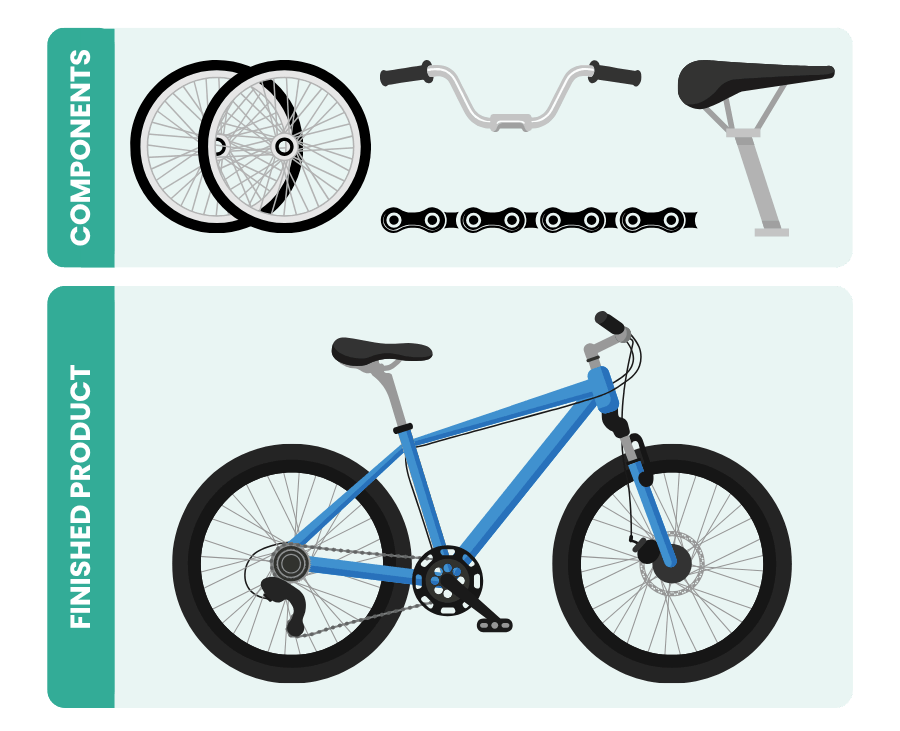
To manufacture one bicycle, the company needs one frame, two wheels, one handlebar, one saddle, one chain, and one brake kit. A customer orders 20 bicycles by the end of the month.
Before launching assembly, the manufacturing order makes it possible to check the required components. The company quickly sees that it has enough frames, wheels, and handlebars, but is missing 6 brake kits.
Without this check, the workshop could have started assembly and then been blocked during production. With the MO, the issue is identified before launch.
The company can then order the missing brake kits, adjust the schedule, or inform the customer if needed. The workshop knows what to produce, purchasing knows what to order, and sales has reliable information.
An MO quickly loses its value if component consumption is recorded too late.
As soon as manufacturing moves forward, inventory movements should follow. This prevents the business from relying on overly optimistic theoretical stock, especially when several orders or production runs are in progress at the same time.
That is why it makes sense to include real-time inventory updates in the manufacturing process.
Manufacturing rarely goes exactly as planned. A quantity may be adjusted, a component may be replaced, or material loss may be identified.
Tracking these discrepancies helps improve future production runs instead of repeating the same approximations. For example, discrepancies may reveal a poorly calibrated BOM, a step that takes too long, a fragile component, or an inaccurate deadline estimate.
Many errors occur when information moves between several files, several people, and several versions. A BOM in Excel, an order in invoicing software, manually updated inventory, or a production instruction sent by email.
Centralizing information allows sales, purchasing, inventory, and production teams to work from the same data, with fewer back-and-forth exchanges and fewer errors.
The goal is not to implement a complex ERP, but to choose a complete tool that is simple to use, like Erplain.
A manufacturing order helps B2B SMBs organize production, track consumed components, and make inventory more reliable. But to be truly useful, it must rely on up-to-date data that all teams can access.
With Erplain, businesses can manage assembled products, create manufacturing orders, routings, and BOMs, and track manufacturing steps from a single tool. The components used are directly linked to inventory, which helps maintain a more reliable view of available quantities and finished goods in real time.
Erplain also makes it possible to track statuses, quantities to manufacture, planned dates, and produced batches. Teams gain visibility into what is planned, launched, completed, or on hold.
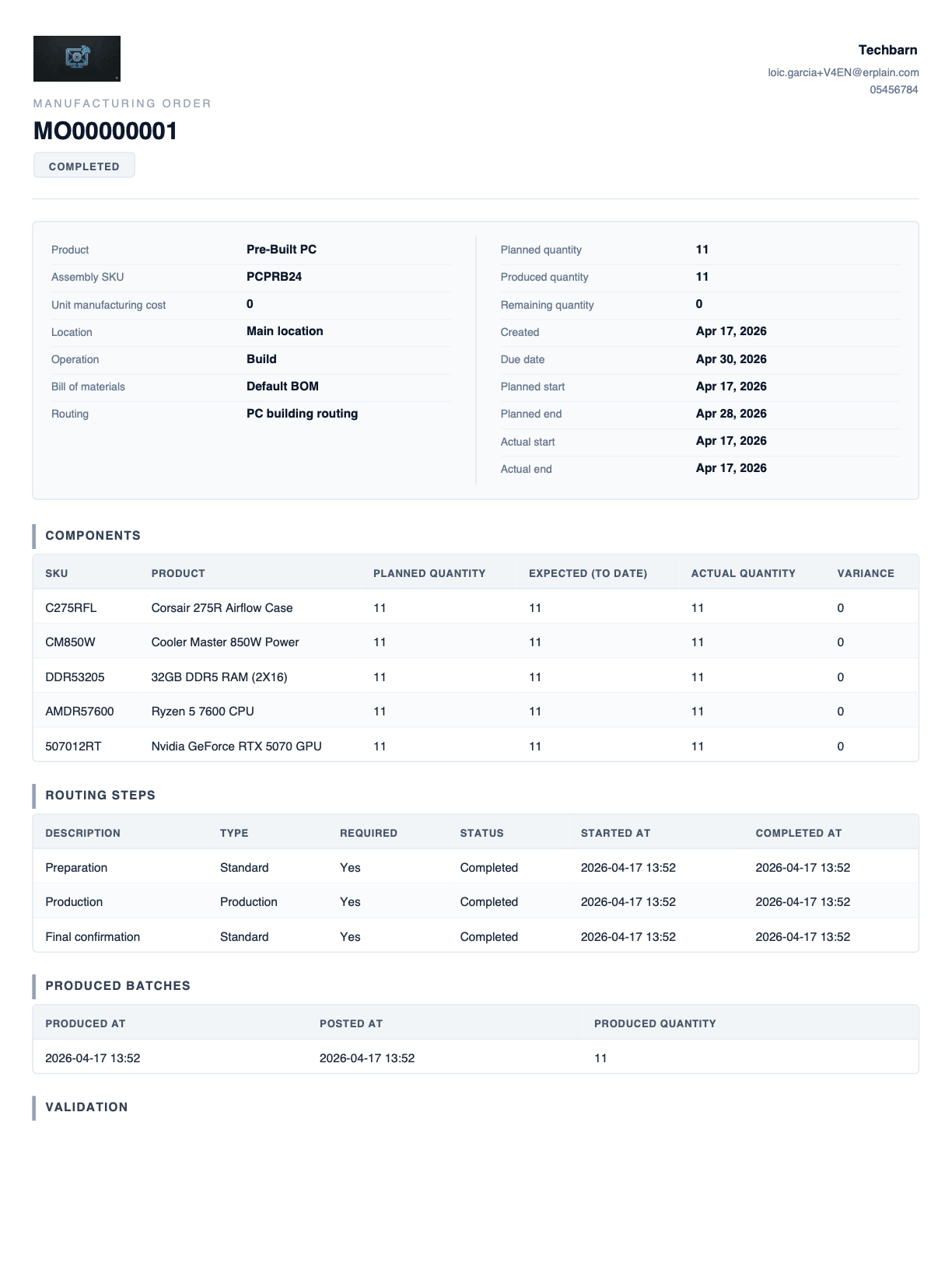
A manufacturing order is a document or digital record used to launch and track the production of a finished or semi-finished product. It indicates:
To create a manufacturing work order, you need to define the product to be manufactured, the planned quantity, the BOM to use, the required components, the manufacturing routing, the planned dates, and any production instructions. The MO, or manufacturing order, is then launched, tracked during production, and closed when the finished goods are recorded in inventory.
The steps vary depending on the activity, but they often include:
The BOM defines the components required to manufacture a finished product, along with the associated quantities. The routing describes the steps to follow to complete that manufacturing process. The BOM answers the question “what is it made with?” The routing answers the question “how is it made?”
Real-time tracking makes it possible to know where production stands, which quantities have been manufactured, which components have been consumed, and what discrepancies have appeared. It helps anticipate shortages, limit delays, and keep inventory more reliable.



.png)